MenuList
Feature overviewSee what MenuList can do for your business.

Start

Menu importStart from the menu or service list you already have.Menu content prepDescriptions, images, and languages prepared for review.Featured ChoicesGuide customers to popular, quick, and value choices.

Publish

Official Business PageOne customer link for public business details.QR menu and linksShare the current approved list everywhere.Print-ready kitTemplates, editor, QR, and printer files.

Operate

AI Menu ManagerUpdate your list by message, with approval cards.Owner phone dashboardManage daily menu work from your phone.Activity viewSee visits, QR opens, searches, and customer actions.Business HealthSee what needs attention today.Menu quality validationCatch prices, gaps, and readiness issues before publish.Customer feedback loopPrivate issue reports from public views.Public discoveryMake your public page easier for customers to find and read.
Start from one approved listThese features keep your customer link, QR, page, and print materials pointing to the latest approved list.
Create customer link
AI Menu ManagerHow it worksMulti-locationPricing
Resources
MenuList ToolsMenu EngineeringQR Menu GuideDigital Menu vs PDFGoogle Menu GuideRestaurant Menu SEOAI Search & Menu DiscoveryOfficial customer linkAll Resources
LoginStart menu preview

Public discovery

Give customers and search tools a clearer page to read.

MenuList prepares public pages, clear business details, discovery files, and owner-controlled copy so your business has a better page to read. No ranking or answer-placement promises.

Create customer link →See all features
Clear public pageNo ranking promises

Cleaner public information starts from the approved list

Menu, business details, public pages, search settings, discovery files, and AI context point back to the current owner-controlled version.

Publish clear public business pages.

The official page and public menu show visible business details from the owner-approved list.

Public pageSearch setupAI context
Official pageSearch setupSearch-readable copyDiscovery filesNo ranking promise

Discovery journey

From scattered details to a clearer public page.

Clear public pages give search tools and AI assistants a better page without promising placement.

PublishMake visible public pages from approved business details.ClarifyAvoid vague or stale public business information.StructureMake approved details easier for systems to interpret.Stay honestKeep discovery claims modest and credible.

Visible page

Publish clear public business pages.

The official page and public menu show visible business details from the owner-approved list.

MenuBusiness detailsPublic page

Business details

Customers and search tools can read visible public information.

Public page

The business gets a clearer page than scattered screenshots.

Menu content

The approved menu becomes part of the public page.

Discovery problem

Reduce unclear public information.

Search engines and AI assistants can struggle when old PDFs, thin pages, and scattered social links carry conflicting details.

Old PDFsThin pagesConflicting details

Readable copy

Public text describes the actual current business.

Search context

Clear information helps describe what has been published.

Refresh discipline

The public page should follow current owner-approved details.

Clear page details

Prepare clear public information.

Page details, search settings, discovery files, and AI context help describe the published page without pretending to control external platforms.

Page detailsSitemapAI context

Page details

Information is easier to understand when it is visible, organized, and connected to the current page.

Owner-approved copy

Public copy follows the page the owner controls.

Discovery files

Discovery files point systems to public pages without making display promises.

Claim boundary

No ranking or answer-placement promise.

Google, Bing, ChatGPT, Perplexity, Claude, and other tools decide what they crawl, cite, show, or summarize. MenuList helps by making the official page clearer.

No guaranteeClear pageOwner approved

No ranking promise

The claim stays believable for owners and buyers.

Official page

Systems have a cleaner page to read when they choose to read it.

Customer trust

Clear public details help customers too, not only search tools.

Public page proof

Discovery work is framed as clearer public pages, not ranking promises.

The owner side keeps discovery-related placement and public-page tasks grounded in what MenuList can truthfully support.

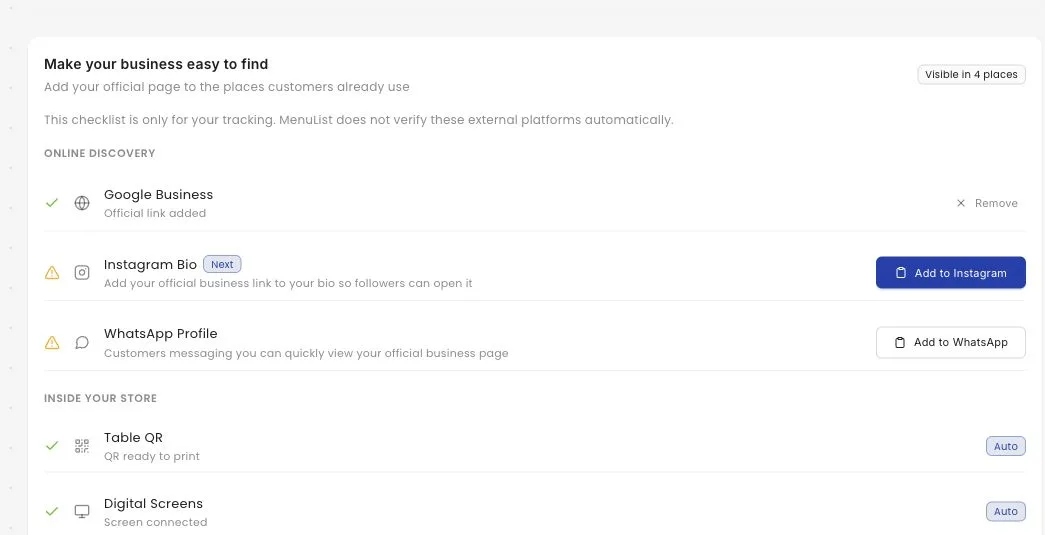
Presence checklist

Manual public placement stays visible

MenuList can help owners track where their official link should be placed, while still avoiding automatic external-platform claims.

MenuList owner screen showing a public presence checklist for placing the official menu link on external channels

Folded capabilities

Discovery attributes strengthen this page.

Business details, public copy, and page clarity are one public-page story, not separate top-nav products.

Business attributes as public proof

Services, payment methods, amenities, dietary fit, and custom attributes help describe the business more clearly.

ServicesPaymentsPublic details

Responsible search and AI language

MenuList can prepare clearer information for systems to read while avoiding citation, ranking, or answer-placement promises.

Search setupOwner copyNo guarantees

Credibility

Search copy should stay owner-controlled.

Clear public information works best when it reflects the actual current business.

Visible business details

Customers and search tools can read the same public information instead of hidden owner data.

Aligned discovery setup

Public routes, discovery files, page details, and AI context are kept aligned with the current MenuList page.

No visibility guarantees

The website stays honest about external platforms deciding what they show.

Better public consistency

When menu and business details stay current, the public page becomes easier to trust.

Public page

Be clearer online without making false promises.

MenuList helps prepare the public business page that customers, search engines, and AI assistants can read.

Create customer link →Back to all features

Ready when your list is

Put one trusted customer link online.

Start from the menu, price list, catalogue, or service list you already have. MenuList prepares the customer-facing version and keeps the links and materials around it.

Create customer link →See plans

Owner approval before publishing

The public menu or service list should come from the business, not from old PDFs or scattered screenshots.

One approved list

Customers keep reaching the current version instead of old PDFs, screenshots, or scattered links.

Simple for one location. Ready for many.

Start with one business. Keep the structure ready for locations, governance, and public consistency.

MenuList

One approved customer link for your menu, services, and business details.

MenuList keeps your approved list behind every link, QR, and printed material customers use.

hello@menulist.ai
InstagramLinkedIn

Product

  • AI Menu Manager
  • How it works
  • Features
  • Multi-location
  • Pricing

Start

  • Public proof
  • Official Business Page
  • MenuList Tools
  • Create customer link
  • About
  • Contact

Resources

  • Menu Engineering
  • QR Menu for Restaurants
  • Digital Menu vs PDF
  • Google Business Profile Menu
  • Restaurant Menu SEO
  • AI Search & Menu Discovery
  • Official customer link
  • FAQ
  • Trust & Security

Legal

  • Privacy Policy
  • Terms of Service
  • Refund Policy

Get an AI summary of MenuList:

CClaudeCChatGPTGGemini

© 2026 MenuList. Built in India.

One public link. Easy for customers to find.