
Customer feedback loop
Customers can report wrong prices, missing items, outdated details, or service concerns from the public menu, Official Business Page, QR, or direct link. Owners review the feedback privately and update the approved list when needed.
A customer flags a wrong price or outdated detail. The owner reviews it before anything changes publicly.
How customer reports get fixed
Make an issue easy to report, keep it private, and fix the approved menu or business page when the report is right.
Step 1
Add feedback access from the public menu, Official Business Page, feedback QR, or direct link so customers do not need to find a phone number or send screenshots.
A feedback QR can sit near the counter, exit, table, or takeaway material.
Share a feedback link when you want a customer to report the issue privately.
Feedback stays connected to the same public page customers use.
Step 2
The form is built for useful reports: message, issue type, where it happened, and optional contact details where settings allow.
A customer can explain what looked incorrect in the public menu.
Service concerns can still reach the owner privately for follow-up.
Store and menu settings control when customers can send feedback and which details they may include.
Step 3
Owners can review new feedback, mark it handled, and keep attention on the items that need action.
Feedback is reviewed on the owner side instead of being published automatically.
Owners can check feedback from the phone dashboard when they are away from a desktop.
Owner access and staff roles protect who can review customer reports.
Step 4
When feedback reveals a real issue, correct the menu or business detail once. MenuList pages then use the corrected list.
Fix the item, price, section, or detail from the menu that publishes publicly.
Mark feedback resolved after the owner has checked it.
Customers keep returning to the current approved version instead of old screenshots or comments.
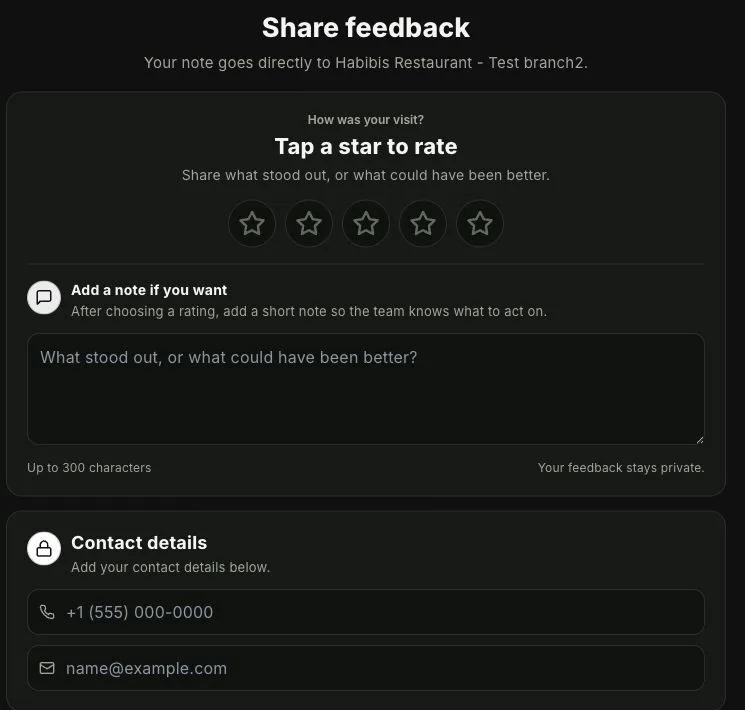
Private customer report
This customer form shows how a wrong price, missing item, or outdated detail can be reported privately. The owner review stays inside MenuList.
A customer can report wrong prices, missing items, outdated details, or other menu issues without making the report public.
Where it helps
Use it to fix reported issues, not to collect public reviews or track customer sentiment.
Feedback can start from the MenuList pages, links, or QR codes customers already use.
Review each report, mark it handled, and see it in Business Health when it needs attention.
Owner control
Reports do not become public reviews. They give you a private way to check and fix what customers say is wrong.
Feedback goes to the owner side for review instead of becoming public marketing content automatically.
Wrong prices, missing items, outdated details, service concerns, and other customer-reported issues can be handled from one place.
Business Health can show when a customer report needs attention without adding another report for you to study.
The best outcome is simple: owner reviews the issue and updates the same approved list customers use.
Keep details current
Start from your current menu. MenuList adds private feedback and keeps each correction tied to the approved list customers use.